
JVSpin App India: Casino and Sports Betting in Your Pocket
This app puts a full casino and sportsbook on your Android or iOS device. Place bets on cricket, football, and kabaddi, then switch to slots or live dealer tables without closing the app. Mobile play frees you from a desktop browser and removes the need to search for alternate domains during network restrictions. The app loads betting lines and game libraries in seconds on 4G or Wi-Fi. Download the JVSpin app once and keep the full platform in your pocket.
Welcome Bonus +200% up to INR 44,000 on your first 4 deposits!
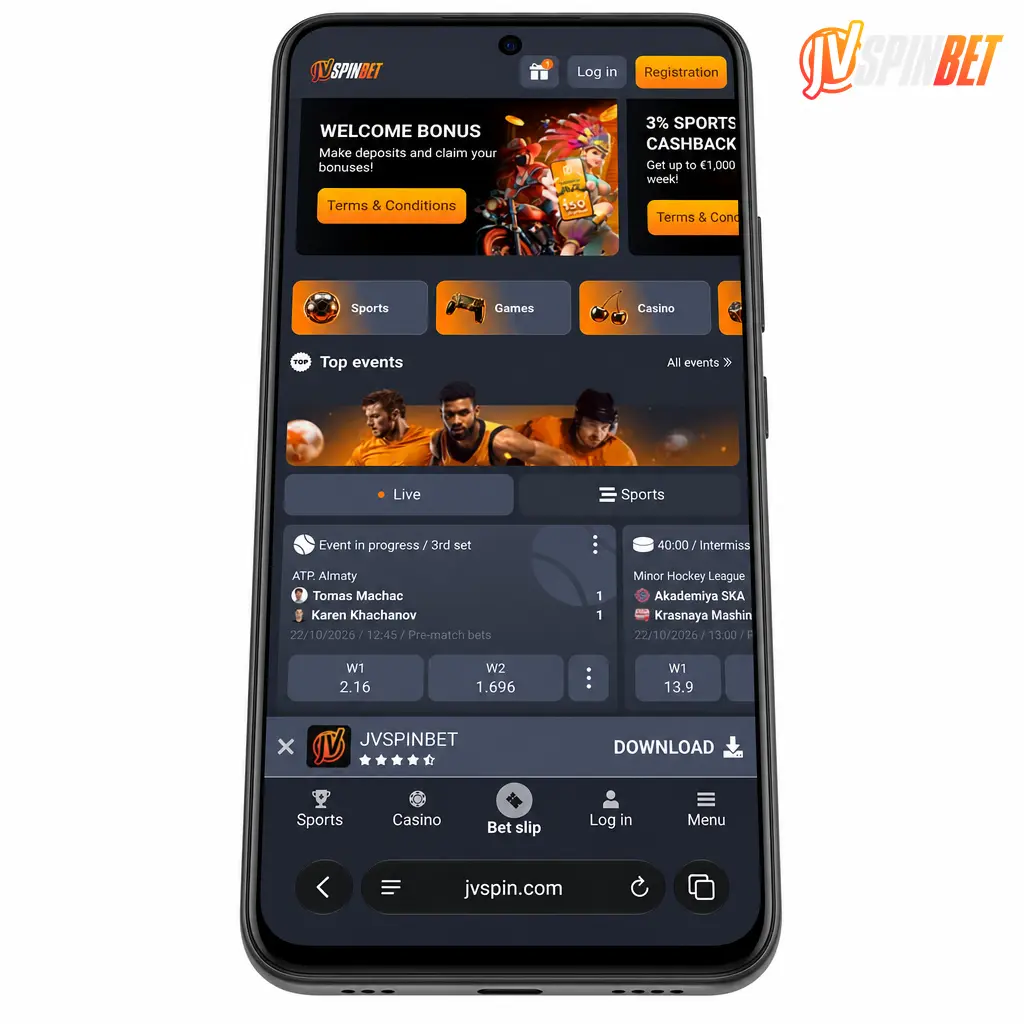
JVSpin App Design and Interface Overview
The app uses a dark navy interface with orange accent highlights, matching the brand palette on the website. Icons and buttons use high contrast orange on near black backgrounds, so odds and bonus prompts stand out under direct sunlight. The layout scales automatically across screen sizes, from a 5.5 inch budget Android phone to a 12.9 inch iPad display. Text and buttons resize without cropping or overlap on any resolution.
Sports Betting, Live Casino, and Support Tools
The JVSpin app carries the full sportsbook from the desktop site. Place pre-match wagers on cricket and football days in advance, or back live markets as odds shift during a match. Selected fixtures stream directly inside the app, so you track the action without switching tabs. The casino lobby holds the same slot catalog as the website, including crash titles like Aviator and JetX. Live dealer tables from Evolution and Ezugi run on the same video feed used on desktop. Bonus codes activate from the promotions tab, and a support chat icon stays visible on every screen.
App vs Mobile Browser: Which Wins for India Players
The JVSpin mobile website needs no download and takes no storage space on your device, which suits players testing the platform or using a shared phone. The app wins on daily use. Interface elements sit packed into the installed code, so screens load without pulling fresh UI data from the server each time. Data consumption drops as a result, and the app holds a stable connection on weak 3G signal strength where a browser tab might stall.
Download JVSpin App India: Fast and Free Setup
Downloading the JVSpin app costs nothing and takes under two minutes on an average 4G connection. The app runs on Android, iOS, and Windows, so most devices used across India are covered. Install it once and avoid the browser step every time you want to check odds or spin a slot. Grab the download link below and get the full platform running on your device today.
Android APK Installation
Google Play restricts cash wagering apps across most regions, so the Android build ships as a direct APK file instead of a Play Store listing. The APK file carries the same security certificate used on the official website, and installing it poses no risk to your device when sourced correctly.
JVSpin App Download APK: Official Source Only
Download the APK only through the button on this page. Third party forums, file sharing sites, and unofficial app repositories often host altered APK files carrying malware or phishing scripts. This page is the official JVSpin domain, and the button below links straight to the verified file, with no detours through outside pages.
JVSpin Apk Download and Android Setup
Installing the Android build takes six short steps. Follow the instructions below in order, with no outside redirects.
Tap the download button below.
This starts the APK file transfer straight from the official website.
Allow unknown sources.
Open your phone Settings, select Security or Apps, and turn on installation from unknown sources for your browser.
Open the downloaded file.
Find the APK file in your Downloads folder and tap it to launch the installer.
Confirm the installation prompt.
Tap Install when the Android system dialog appears, then wait for the progress bar to finish.
Open the app.
Tap the new icon from your home screen or app drawer.
Sign in or register.
Log into an existing account or create one to reach the sportsbook and casino lobby.
JVSpin Android App: System Requirements
The Android app runs on most phones sold in India over the past five years. Keep the app updated to the latest version for the best performance.
| Parameter | Minimum | Recommended |
|---|---|---|
| Operating System | Android 7.0 | Android 10 or newer |
| RAM | 2 GB | 4 GB or more |
| Storage Space | 80 MB free | 150 MB free |
| Internet Connection | 3G | 4G or Wi-Fi |
| Screen Resolution | 720×1280 | 1080×1920 or higher |
JVSpin App for iPhone and iPad
The app runs natively on iOS, with layouts tuned for every iPhone screen size sold since the iPhone 8. Gameplay and betting markets load at the same speed as the Android build, with no missing features between platforms.
JVSpin App iOS Download and Setup Options
The app sometimes appears on the App Store under a regional Apple ID, since gambling app listings vary by country. If it shows as unavailable under an India Apple ID, switch your App Store region, or add the web app to your home screen through Safari to get an icon with complete app functionality. Use the download link on this page only.
iOS Installation Guide
An iPhone or iPad setup for the JVSpin app through Safari takes five steps.
- Tap the download button below. This opens the install page built for iOS.
- Open the link in Safari. iOS requires Safari for the home screen installation process to work.
- Tap the Share icon. Find the square icon with an upward arrow at the bottom of the Safari screen.
- Select Add to Home Screen. Confirm the app name and tap Add in the top corner.
- Launch the app from your home screen. Tap the new icon to open the app and sign in.
JVSpin iOS App: System Requirements
The iOS build supports recent Apple hardware. Confirm your device meets the specifications below.
| Parameter | Minimum | Recommended |
|---|---|---|
| Operating System | iOS 13 | iOS 16 or newer |
| Device Compatibility | iPhone 8 or later | iPhone 11 or later |
| Storage Space | 100 MB free | 200 MB free |
| Internet Connection | 3G | 4G or Wi-Fi |
JVSpin Windows App for Desktop Play
A dedicated Windows application gives desktop users a direct route into the platform, with no browser tab needed. It stays stable during long sessions and reconnects fast after a dropped internet connection.
Windows Installation Guide
A Windows PC setup for the desktop application takes five steps.
Click the download button below.
This downloads the Windows installer file directly from this page.
Open the installer file.
Locate the downloaded .exe file in your Downloads folder and double click it.
Approve the security prompt.
Click Yes if Windows asks for permission to run the installer.
Follow the setup wizard.
Choose an install folder and click Install to finish the setup.
Launch the JVSpin app and log in.
Open the new desktop icon and sign into your account to start playing.
Create or Access Your JVSpin Account in the App
Account setup inside the app takes under a minute. Returning players sign back in with the same ease, through a login screen built for quick access.
How to Register a New Account
New account registration through the app follows five steps.
Click the button below to open the registration screen.
Enter your mobile number and set a password for your account.
Select INR as your preferred currency.
Confirm your email address or phone number through the verification code sent to you.
Complete your profile and accept the terms to activate your account.
How to Log Into Your Account
Login to an existing account on the app takes four steps.
Players with an existing account must not register a new one. Duplicate accounts violate the platform terms and can lead to frozen balances.
Click the button below to open the login screen.
Enter your registered mobile number or email address.
Type your password and tap Log In.
Access your dashboard, balance, and bet history straight away.
Sports Betting Inside the JVSpin App
Live odds inside the app update the instant a wicket falls or a goal gets scored, so you grab favorable lines before they shift. Every market available on the desktop site carries over to mobile, including cricket, football, tennis, and kabaddi lines, plus outright and prop bets. The bet slip tracks selections across multiple matches at once. Place a single bet or build an accumulator without leaving the match page.
Step by Step Betting Guide
A first bet through the app follows six steps.
Click the button below to open the sportsbook.
Place a BetSelect a sport, such as cricket or football, from the menu.
Choose a match and tap the odds for your pick.
Review the selection added to your bet slip.
Enter your stake amount in INR.
Tap Place Bet to confirm your wager.
Mobile Casino Games Inside the JVSpin App
Most players now spin slots and deal cards from a smartphone rather than a desktop. Leading studios such as Pragmatic Play and BGaming build their titles on HTML5, so the app runs them without lag and with full touch screen controls.
Game Categories Available on the Platform
The app groups its library into clear categories for fast browsing.
- Slots: thousands of video slot titles from providers including Pragmatic Play, BGaming, and Ela Games, covering classic reels and bonus buy formats;
- Live Casino: dealer hosted roulette, blackjack, baccarat, and game show titles streamed from Evolution and Ezugi studios;
- Crash Games: fast round titles such as Aviator and JetX, where a rising multiplier can cash out at any second;
- Table Games: digital blackjack, roulette, baccarat, and poker variants with no live dealer required;
- Jackpot Games: progressive and fixed jackpot slots with prize pools that climb across the network.
Payment Methods for JVSpin App Users in India
Every deposit and withdrawal inside the app runs through encrypted payment channels. India players reach the cashier using UPI, Paytm, and a set of cryptocurrency options, so funding an account or pulling out winnings fits local banking habits. Processing times and limits vary by method, as shown below.
| Method | Type | Processing Time | Limits |
|---|---|---|---|
| UPI | Deposit and Withdrawal | Instant deposit, up to 24 hours withdrawal | INR 300 to INR 200,000 |
| Paytm | Deposit and Withdrawal | Instant deposit, up to 24 hours withdrawal | INR 300 to INR 150,000 |
| Google Pay | Deposit | Instant | INR 300 to INR 200,000 |
| Visa | Deposit and Withdrawal | Instant deposit, 3 to 5 business days withdrawal | INR 500 to INR 300,000 |
| Mastercard | Deposit and Withdrawal | Instant deposit, 3 to 5 business days withdrawal | INR 500 to INR 300,000 |
| AstroPay | Deposit and Withdrawal | Instant deposit, up to 24 hours withdrawal | INR 500 to INR 150,000 |
| Bitcoin (BTC) | Deposit and Withdrawal | 10 to 30 minutes | INR 1,000 to INR 1,000,000 |
| Tether (USDT) | Deposit and Withdrawal | 10 to 30 minutes | INR 1,000 to INR 1,000,000 |
| Skrill | Deposit and Withdrawal | Instant deposit, up to 24 hours withdrawal | INR 500 to INR 200,000 |
How to Deposit Funds Through the JVSpin App
The deposit process through the app takes less than a minute with UPI.
Click the button below to open your account.
Log into the app and head to the cashier.
Tap Deposit.
Find the Deposit button on your account dashboard.
Pick a payment method.
Choose UPI, Paytm, a card, or a cryptocurrency option.
Enter your deposit amount.
Type the INR amount you want to add, within the stated limits.
Confirm the transaction.
Approve the payment through your UPI app or banking portal, and your balance updates right away.
How to Withdraw Winnings From the JVSpin App
Withdrawal requests on the app follow the same cashier screen used for deposits.
Click the button below to open your account.
Log into the app and go to the cashier section.
Tap Withdraw.
Select the Withdraw option from your account dashboard.
Choose your payout method.
Pick UPI, a bank transfer, or a cryptocurrency wallet matching your deposit method.
Enter the withdrawal amount.
Type the INR amount within your available balance and method limits.
Submit and track your request.
Confirm the request and follow its status from the transaction history tab.
JVSpin App Bonuses and Promo Codes
App players reach every promotion listed on the website, with no separate terms for mobile use. New players claim the welcome offer of +200% up to INR 135,000 plus 150 free spins after their first deposit. Regular cashback promotions return a percentage of net losses over a set period, credited straight to your account balance. Reload bonuses and free spin drops run on selected slots throughout the week, visible from the Promotions tab inside the app. To activate a promo code, open the app menu, tap Promotions, select Enter Code, type the code into the field, and confirm. The bonus credits to your account within moments, ready to wager according to the listed terms. Check the Promotions tab daily, since slot specific offers and cashback percentages rotate on a regular schedule.
JVSpin Mobile Website: An Alternative to the App
The mobile website suits players who prefer no downloads, run a less common operating system, or want to save storage space on an older phone. Open it directly through Chrome, Safari, or any mobile browser, with no installation step at all. The layout adjusts automatically to your screen size, from a compact Android phone to a tablet display. Every sportsbook market, slot title, and cashier option found in the app stays available through the browser.
JVSpin App Security for India Players
The app runs on SSL encryption, the same standard used by Indian banking apps, to protect your personal details and payment data. Account passwords and transaction records stay encrypted end to end. The official website is the only safe download source, and avoiding third party sources keeps your device fully protected.
FAQ
Is the JVSpin app legal for players in India?
JVSpin operates under a Curacao gaming license, and India law does not prohibit residents from using offshore gambling platforms. Check your state regulations before depositing, since a small number of states apply added restrictions.
Does the JVSpin app cost money to download?
The JVSpin app download and installation stay free on Android, iOS, and Windows. You only spend money once you choose to deposit.
Why does the JVSpin Android app not appear on the Play Store?
Google Play policy blocks gambling apps with cash wagering in most regions, so JVSpin distributes its Android build as a direct APK file from the official website instead.
How long does a withdrawal take through the app?
Cryptocurrency withdrawals process within 10 to 30 minutes. UPI and digital wallet withdrawals complete within 24 hours, and card withdrawals take between 3 and 5 business days.
Can I use the same account on the app and the website?
Your JVSpin account, balance, and bet history sync across the app, the mobile site, and desktop automatically, so you log in with the same credentials everywhere.
Updated: